
Liho Cowork
A general-purpose agent for documents, data, code and the browser. Describe the task in plain words — the agent does it and shows every step.
- Computer
- Your server
- Liho Cloud
- Browser
Hand a task to Liho Cowork, a general-purpose agent that sorts documents, changes code, works in a browser and returns the finished result. Build software in Liho IDE: on its own core, agents see data from every tool, and their changes go through your review. Connect models to your own apps through the Liho LLM API, paid in rubles.
Cowork and IDE run on macOS, Windows and Linux. Models are paid for from your Liho LLM account balance.
A general-purpose agent for documents, data, code and the browser. Describe the task in plain words — the agent does it and shows every step.
Its own core: agents see data from Git, CI, Kubernetes and other plugins, and the IDE adapts to their edits. AI SDLC out of the box
An API to 38 models paid in rubles. One key, Chat Completions format
Your own Linux server: tasks and schedules keep running when your computer is off
curl -fsSL https://dl-cowork.liho.dev/server/install.sh | sudo bashA workspace on Liho servers — no hardware of your own
How to connectTasks and Decisions on your phone. For now — in the browser
Pick a task to see which product handles it and what happens, step by step.
Hand to an agent
Write code
Build in a model
Go through a folder of PDF receipts and build a spreadsheet with totals
Hand off a change in a project and run the tests without opening an editor
Rename a hundred scans to a pattern and find duplicates
Check a website every morning and send a summary, even when the laptop is off
Fix a bug, review the agent’s changes and run the tests
Work with Claude Code or Codex next to Git, the terminal and the debugger
Investigate a failed pipeline and prepare a fix in a merge request
Add a language model call to your app or bot
Connect your own agent to models and pay in rubles
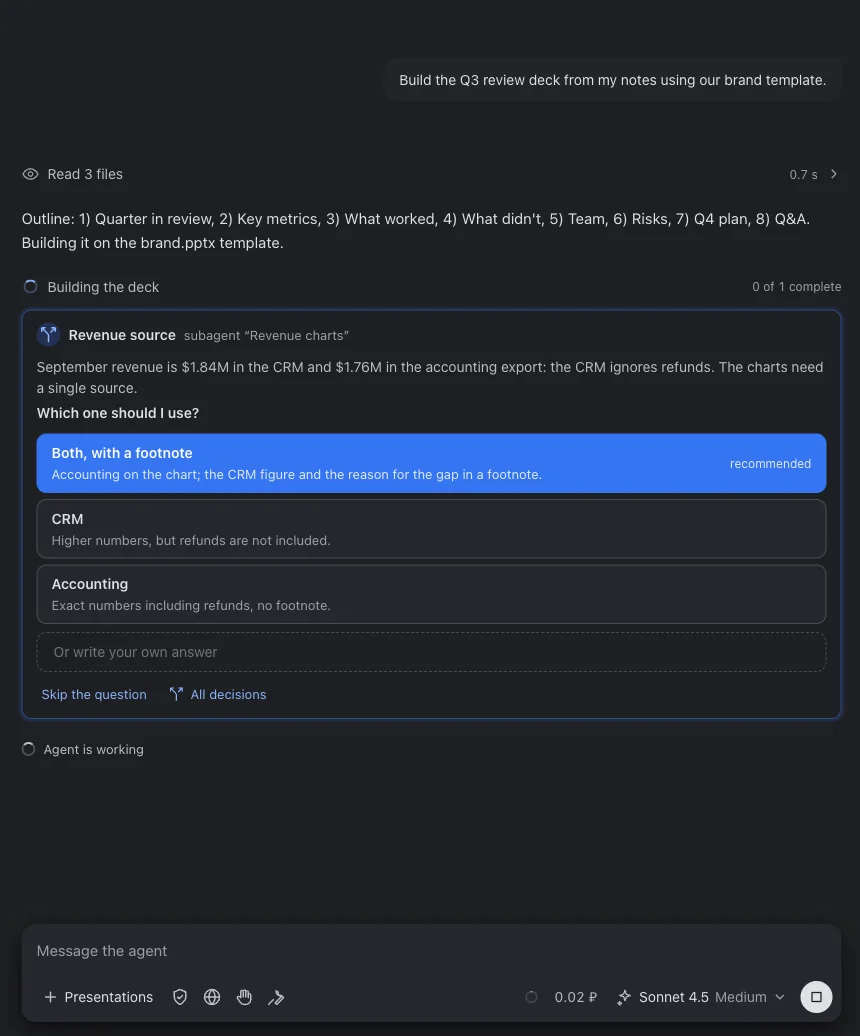
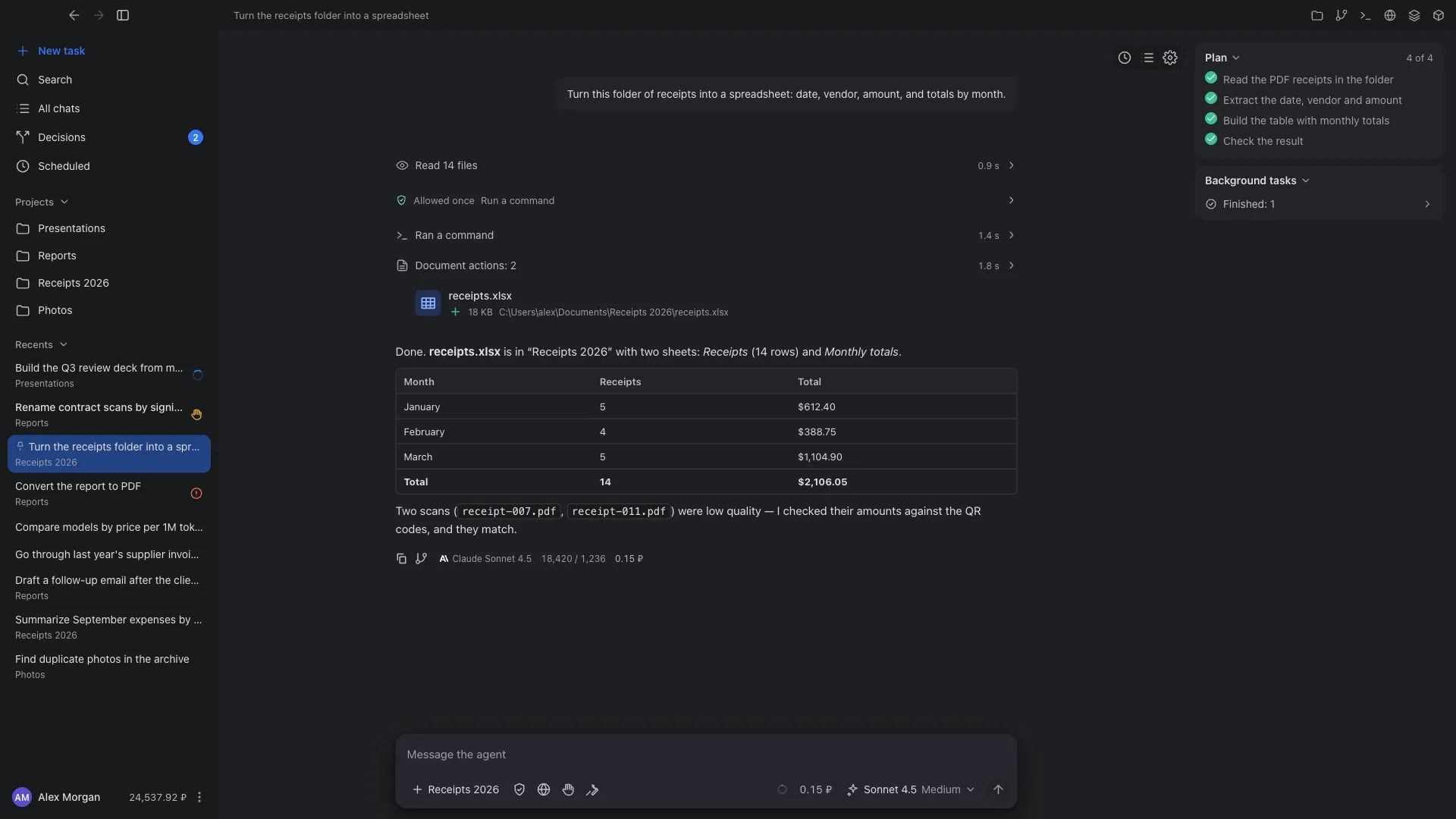
Cowork shows the task plan, the commands the agent ran, and the files it read and created. Expand a step to see the command output or the changes to a file.
How Cowork works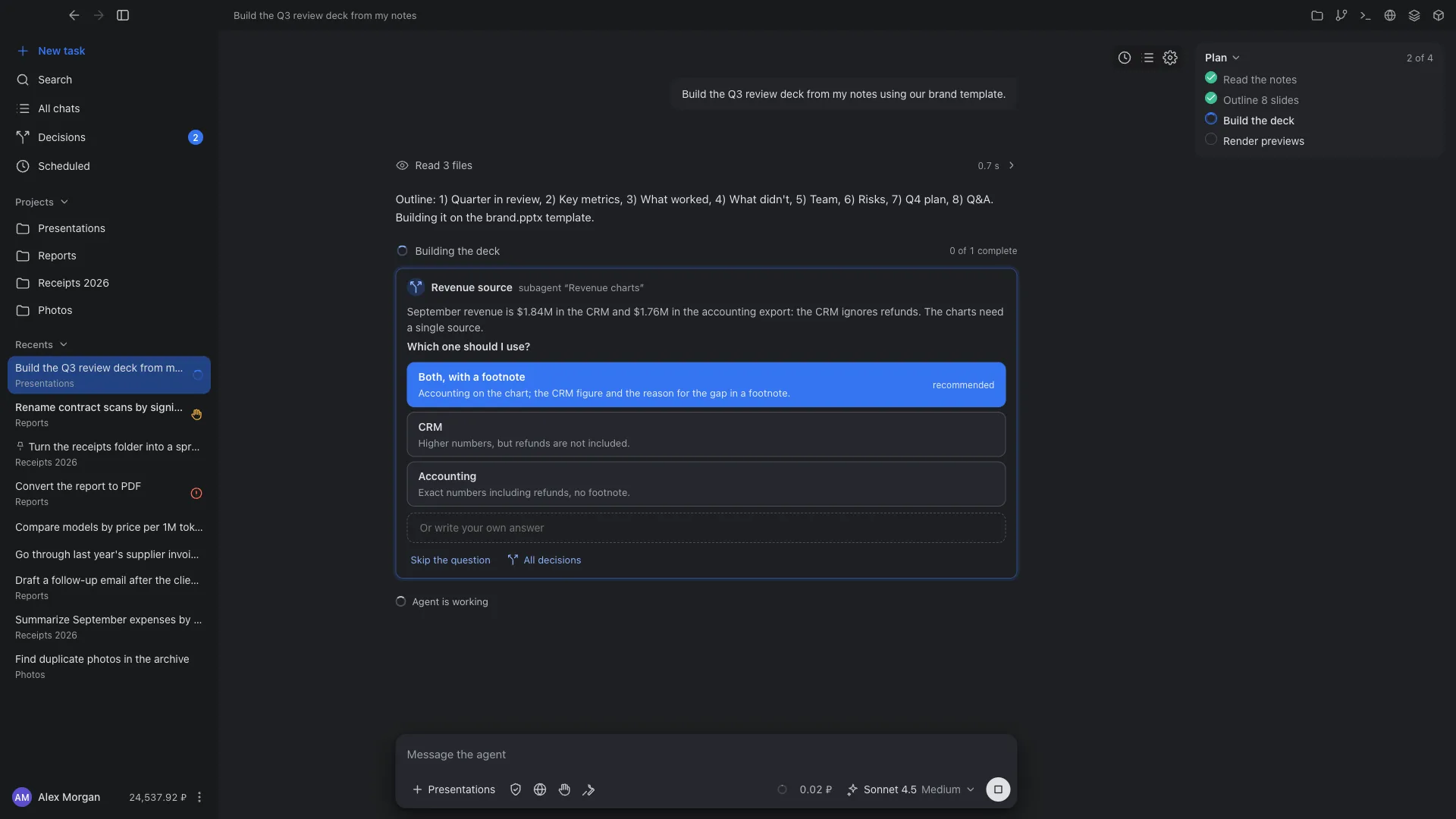
In Liho IDE, the agent reads a merge request, its diff and discussions, and prepares a draft review or a fix. Nothing is sent to GitLab or GitHub until you confirm.
Review and CI in the IDE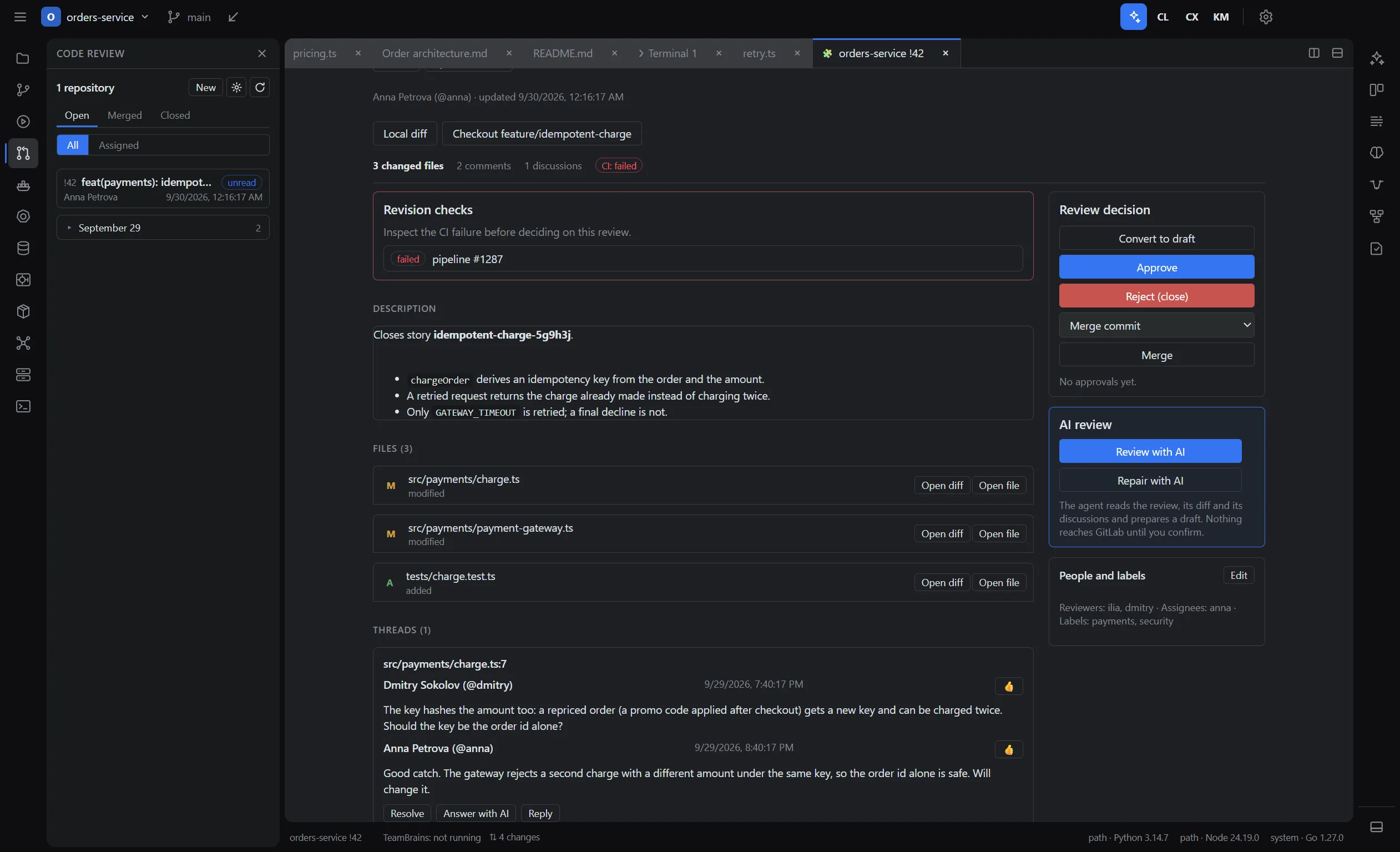
The Liho LLM dashboard shows your request history: model, key, tokens, cost and response time. It also has spending charts and CSV export.
What the dashboard offers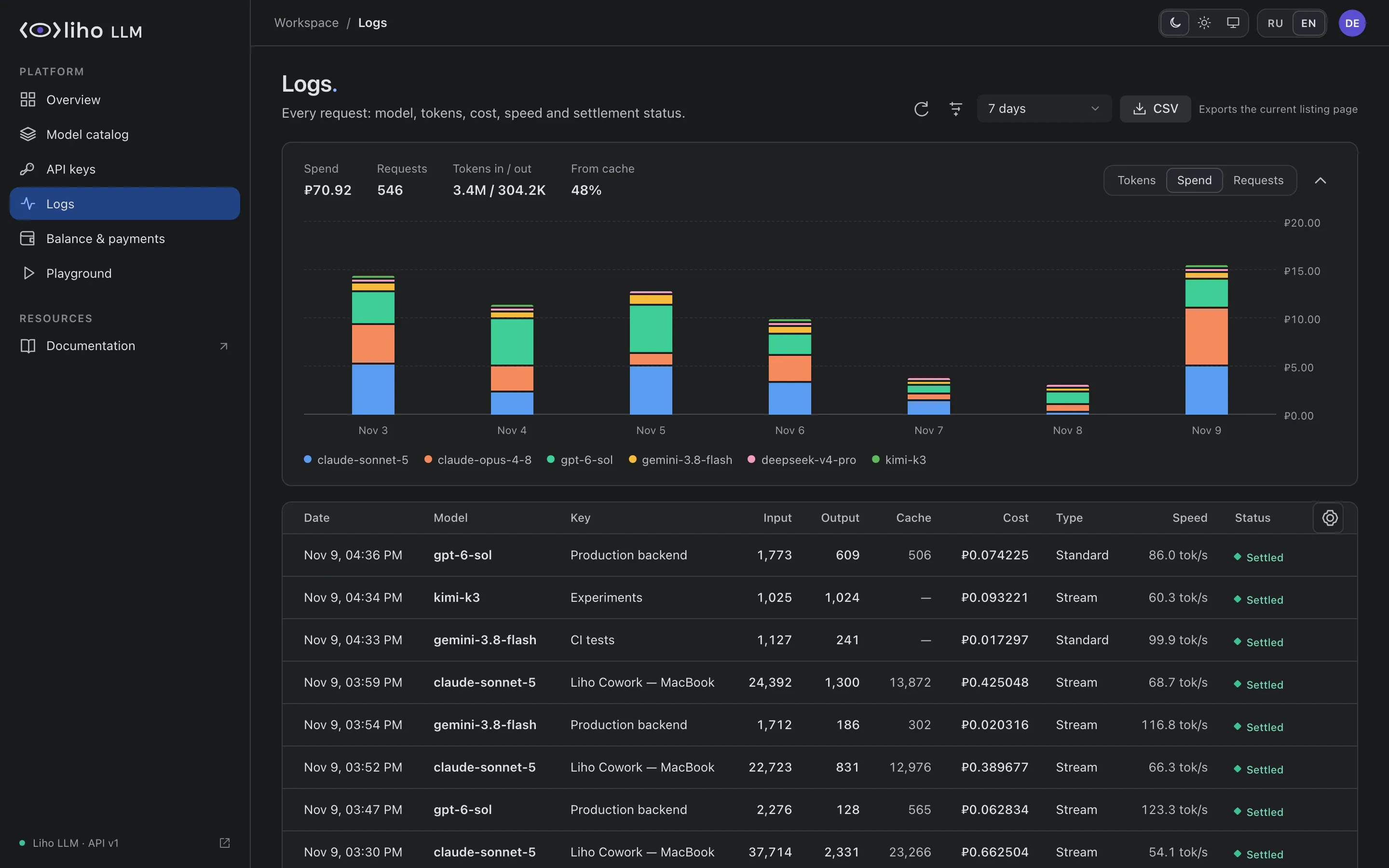
Start a task on your computer, your own server or in Liho Cloud, and manage it from any device: from Cowork on another computer or from a browser.
The agent works with the folders you open, the browser and, with your permission, the desktop.
Your Linux server, connected with one command. Tasks and schedules keep running even when Cowork is closed.
A workspace on Liho servers, created in Cowork settings, that works without your computer.
Open another of your computers, a server or the cloud from Cowork or cowork.liho.dev: the same full app, with changes visible everywhere at once.
Where tasks run and remote controlLiho IDE runs on your computer. Remote development in the IDE is planned.
Prices are in rubles per 1M tokens and already include the service fee. You are charged for the actual usage of each request.
| Model | Developer | Input | Output | Context |
|---|---|---|---|---|
| GPT-6 Sol | OpenAI | ₽24.82 | ₽49.63 | 1M |
| Claude Opus 4.8 | Anthropic | ₽33.09 | ₽165.44 | 1M |
| Gemini 3.8 Flash | ₽8.272 | ₽33.09 | 1M | |
| DeepSeek V4 Pro | DeepSeek | ₽4.963 | ₽4.963 | 1M |
| Kimi K3 | Moonshot AI | ₽45.50 | ₽45.50 | 1M |
38 models from 10 developers. Catalog data as of 10 November 2026.
Create a key, send a request with curl or the OpenAI SDK and get a streamed response.
Liho CoworkOpen a folder of documents to the agent, describe the fields you need and check the finished table.
Liho CoworkInstall Liho Server on a Linux server, connect it to Cowork and set up a recurring task.
Cowork is a general-purpose agent: you describe a task and it does the work itself, with documents, data, websites or a project’s code, including tests and commits. Liho IDE is a full development environment on its own core: an editor, a debugger, Git, issues, review and CI, with agents that get data from every plugin through the core and work inside it. If you want to write and debug code yourself next to an agent, choose the IDE. If you want to hand off a task and get the result, choose Cowork.
For Liho Cowork, yes: signing in to the app and access to models go through a Liho LLM account, and requests are paid from its balance.
For Liho IDE, no. Liho LLM is one way to connect models; you can use your own keys for OpenRouter, Anthropic, OpenAI or another compatible gateway.
You pay for model requests at the prices in the Liho LLM catalog, for input and output tokens. The balance is topped up in rubles. The site does not list a separate price for the Cowork and IDE apps. See the “Pricing” page for details.
Liho Cowork: macOS (Apple Silicon and Intel), Windows x64, Linux x64 (deb and rpm). Liho IDE: macOS on Apple Silicon, Windows x64, Linux x64 (AppImage and deb). Exact files and sizes are in the download center.
In Cowork you choose which folders to open and whether they can be changed, as well as how often the agent asks before acting. By default, new tasks run without isolation and in “Auto” mode: file edits and commands run without asking. You can turn on a process sandbox (on Windows, a virtual machine) and a stricter approval mode for a task.
In Liho IDE, the Liho agent asks permission before every file edit and command, and after each turn you keep or roll back its changes hunk by hunk.
The API supports POST /v1/chat/completions, including streaming and tool calling, and GET /v1/models. For basic text requests, changing base_url and the key in the OpenAI SDK is enough. The Responses API, embeddings, images and audio are not supported.
Liho IDE and Liho Cowork are distributed under the AGPL-3.0 license, but their repositories have not been published yet. See the “About Liho” page for details.
Download Cowork or the IDE. To use models in Cowork you need a Liho LLM account; you can create one the first time you sign in.