
Where Cowork runs tasks
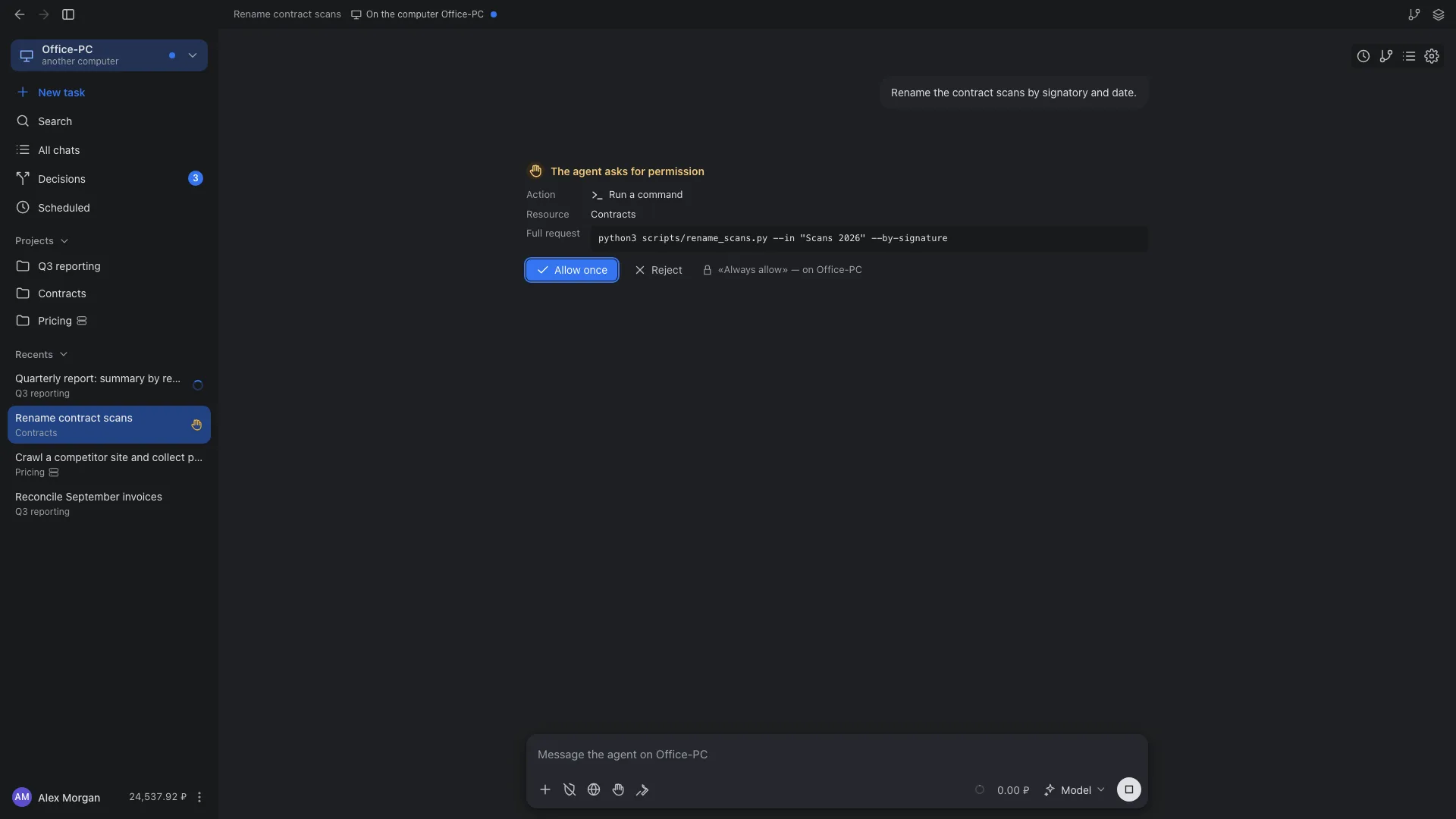
A task runs on your computer, on your Linux server or in a Liho Cloud workspace. You choose the location in a new task, and the project stays tied to it. You can manage tasks from any device: from Cowork on another computer or from a browser.
Comparison
| This computer | Liho Server | Liho Cloud | |
|---|---|---|---|
| Where the agent runs | On your computer | On your Linux server | In a container on Liho servers |
| Files | Folders you opened for the task | The project folder on the server | The project folder in the workspace |
| Browser | A separate app browser | A browser on the server, frames shown in the panel | Same as Liho Server |
| Desktop control | Yes, each action needs confirmation | No | No |
| Built-in Word, Excel, PowerPoint and PDF tools | In Windows virtual machine mode | No | No |
| Schedules | While Cowork is running; only with isolation | While Cowork is closed and the computer is off | Same as Liho Server |
| Isolation | Process sandbox or Windows virtual machine, your choice | A trusted single-owner server, no isolation between projects | Container; the cloud operator can access the files |
| Control from other devices | From Cowork on another computer or from a browser | From Cowork on any computer or from a browser | From Cowork on any computer or from a browser |
| Models | Through your Liho LLM account | Its own Liho LLM key after confirmation in the browser, shared balance | Through your Liho LLM account |
The server cannot see your computer: local folders, programs, browser cookies, service sign-ins and local MCP servers are not available on it. The word localhost in a server task means the server itself.
Remote control
Computers of one account, servers and Liho Cloud see each other. Pick one in the Cowork switcher and the window shows its whole app, as if you were sitting at it. The same works in a browser at cowork.liho.dev.
What you can do on another device
- Follow the task feed live, answer questions and approvals, send messages, queue and stop.
- Start new tasks in its projects and open files, changes, Git, the terminal and the browser.
- Manage its schedules, Decisions and settings: agents, folders, isolation, network, instructions, memory, skills and connectors.
- Files of that computer open in your window and download as a copy; attachments are sent there.
Sync in every direction
- Every action shows up on every device at once: answer in the browser, the task continues on your work computer, the feed updates on your laptop.
- Questions from all computers, servers and Liho Cloud go into the shared Decisions counter and notifications.
- If a computer is asleep or offline, you see its tasks as they were when it disconnected. A message can be queued for up to 24 hours and is delivered in order when the computer is back.
How the connection is protected
- Remote control is turned on separately on each computer. A new computer joins only after you confirm it on an already trusted device: both screens show the same six-digit code.
- The channel between devices is end-to-end encrypted; the Liho relay forwards only ciphertext and stores nothing. Both sides make outbound connections only, so no ports need to be opened.
- Each device gets a level: “View only” or “Manage tasks”. The computer’s log records every change made remotely.
- Approving an action outside the sandbox from a browser requires the computer’s authenticator code.
Your own server for tasks that must run without you
Liho Server is a service on your Linux server. In Cowork it looks just like a computer: files, changes, terminal, browser, schedules, connectors and skills. Tasks and schedules keep running when the app is closed.
Installation
curl -fsSL https://dl-cowork.liho.dev/server/install.sh | sudo bash- Run the command over SSH as root or with sudo.
- Open the link the installer shows, sign in to Liho and confirm the server address.
- The server appears in Cowork under the same account. Select it under “Execution location” in a new task.
Requirements
- x86-64, Ubuntu 22.04+ or Debian 12+, systemd.
- A public IPv4 address, a free inbound port 443, outbound HTTPS.
- 2 GB of memory or more for several projects and the browser.
- No domain, Docker or SSH tunnel needed.
Maintenance
- sudo liho-server status shows the service state; restart restarts it; enroll confirms the server again.
- Updates install automatically and are postponed while work is in progress.
- sudo liho-server uninstall removes the service; project folders are kept.
Limits
- The server is designed for a single trusted owner: all projects run under one service account, with no quotas or isolation between them.
- At most two scheduled runs execute on the server at the same time; up to 32 schedules in total.
- Desktop control and the built-in document tools are not available to tasks on the server.
A workspace on Liho servers
Liho Cloud creates a separate workspace for you with the same Cowork server side. You create it in Cowork settings: “Servers” → Liho Cloud → “Create workspace”. When idle, the workspace goes to sleep and wakes up on demand.
- The workspace keeps working while your computer is off: tasks and schedules run on Liho servers.
- The cloud operator has access to workspace files, so do not put anything there that must not be seen.
- The Cowork web version at cowork.liho.dev works with Liho Cloud just as with your connected computers and Liho Server: tasks can be started and managed from a browser.
A project moves to the server once
When you choose a server for a local project, Cowork shows exactly what will be transferred and, after you confirm, copies the working files. From then on the project lives on the server.
- There is no automatic sync: changes to local files after the move do not reach the server.
- Git history, remotes and credentials are not transferred; a new history starts on the server.
- Additional folders are transferred as copies, as input material.
- Results are downloaded as individual files or as a copy of the project in a new folder. The local original is not overwritten.
- Limit per move: 100,000 files, 2 GiB, 100 MiB per file.
What about Liho IDE?
Liho IDE runs on your computer. Remote development on a server is planned but not available yet.
About Liho IDEStart on your computer, connect a server when you need one
Tasks and schedules move to a server when they need to run without you.