
Hand a task to the agent, from a spreadsheet to a code change
Cowork is a general-purpose agent in a desktop app. You describe the task in plain words and open the folders it needs. The agent reads and changes files, writes and runs code, works in a browser and with services through connectors, asks questions when information is missing, and returns the finished result. Tasks run on your computer, a server or in Liho Cloud, and you can manage them from any device.
macOS, Windows and Linux. Sign-in and models through a Liho LLM account.
From task to result
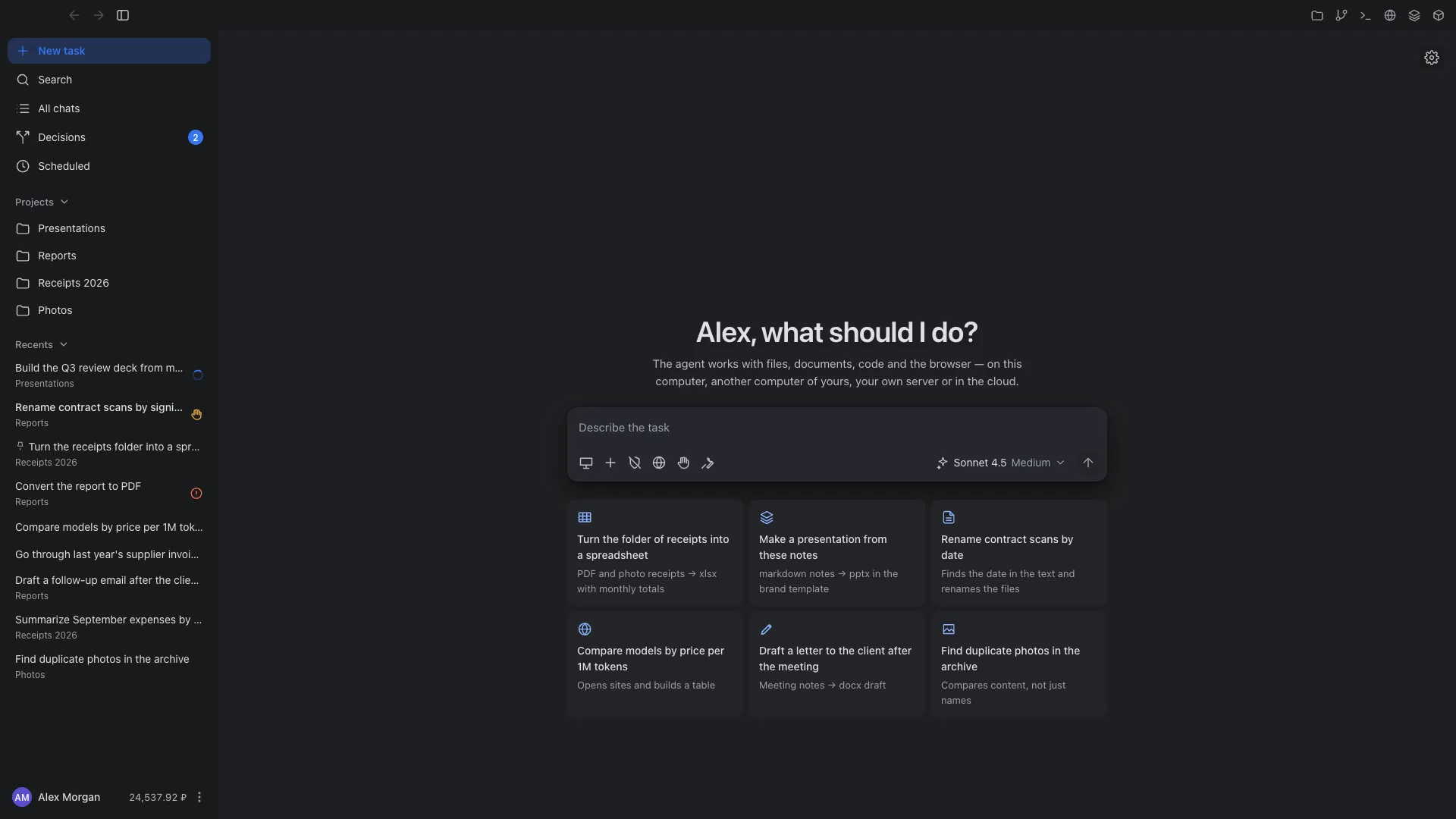
Describe the task
Write what needs to be done and attach files or open a folder, read-only or with permission to make changes.
The agent works
It makes a plan, reads and changes files, runs commands and code, and opens websites. Every step is visible in the chat.
You settle the open questions
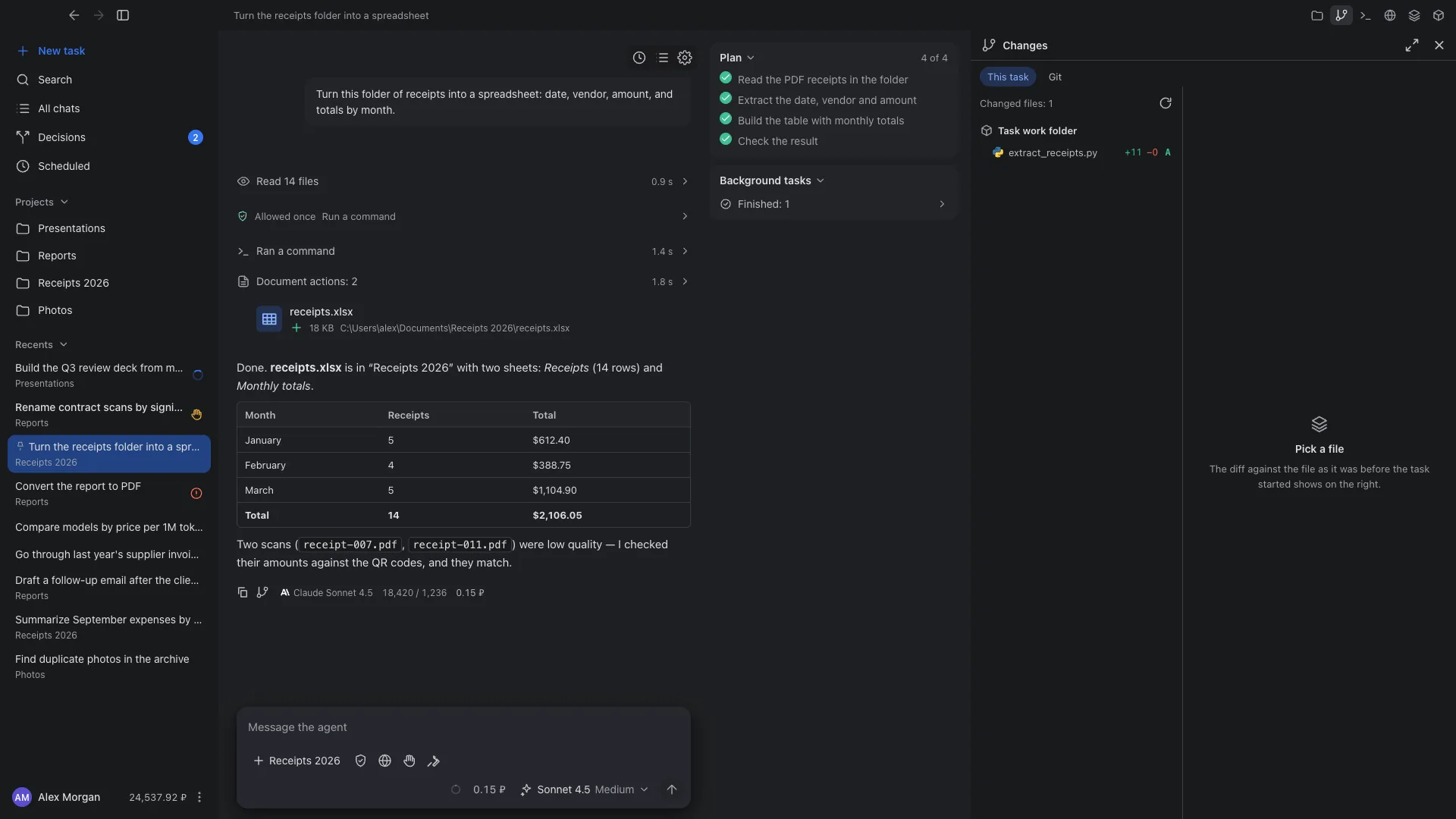
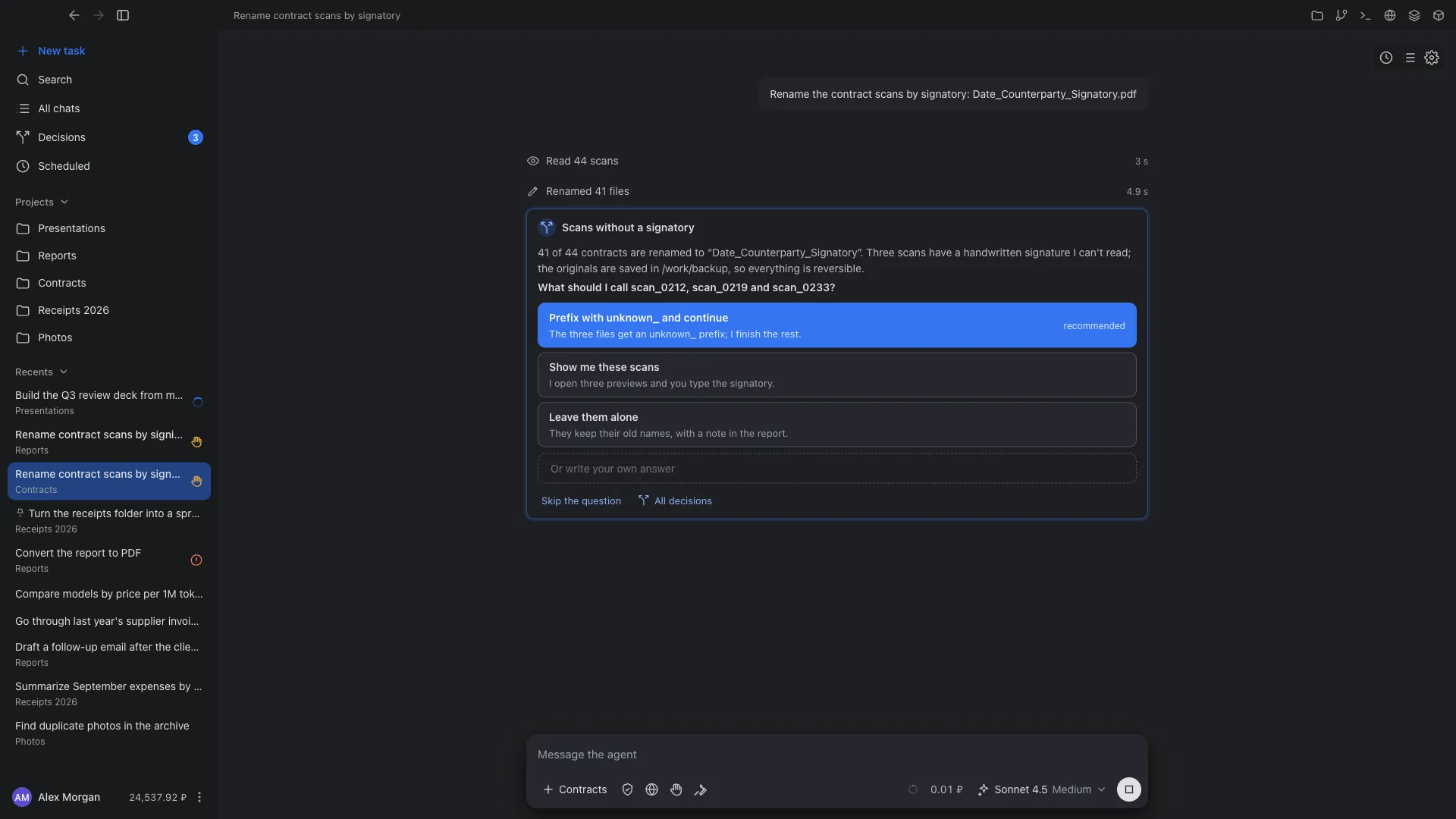
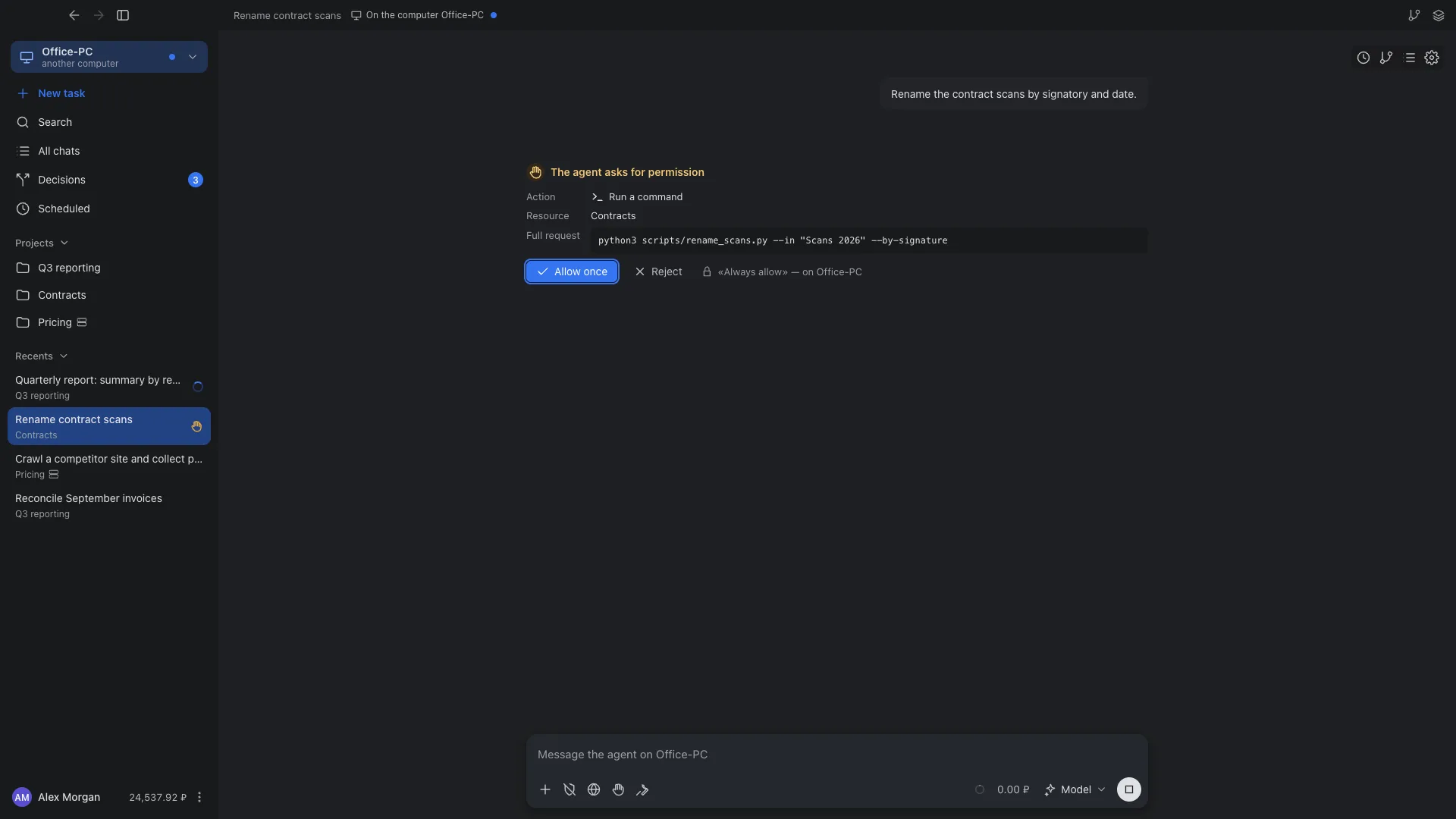
If information is missing, the agent asks a question with answer options. Actions that need permission wait for your approval.
You collect the result
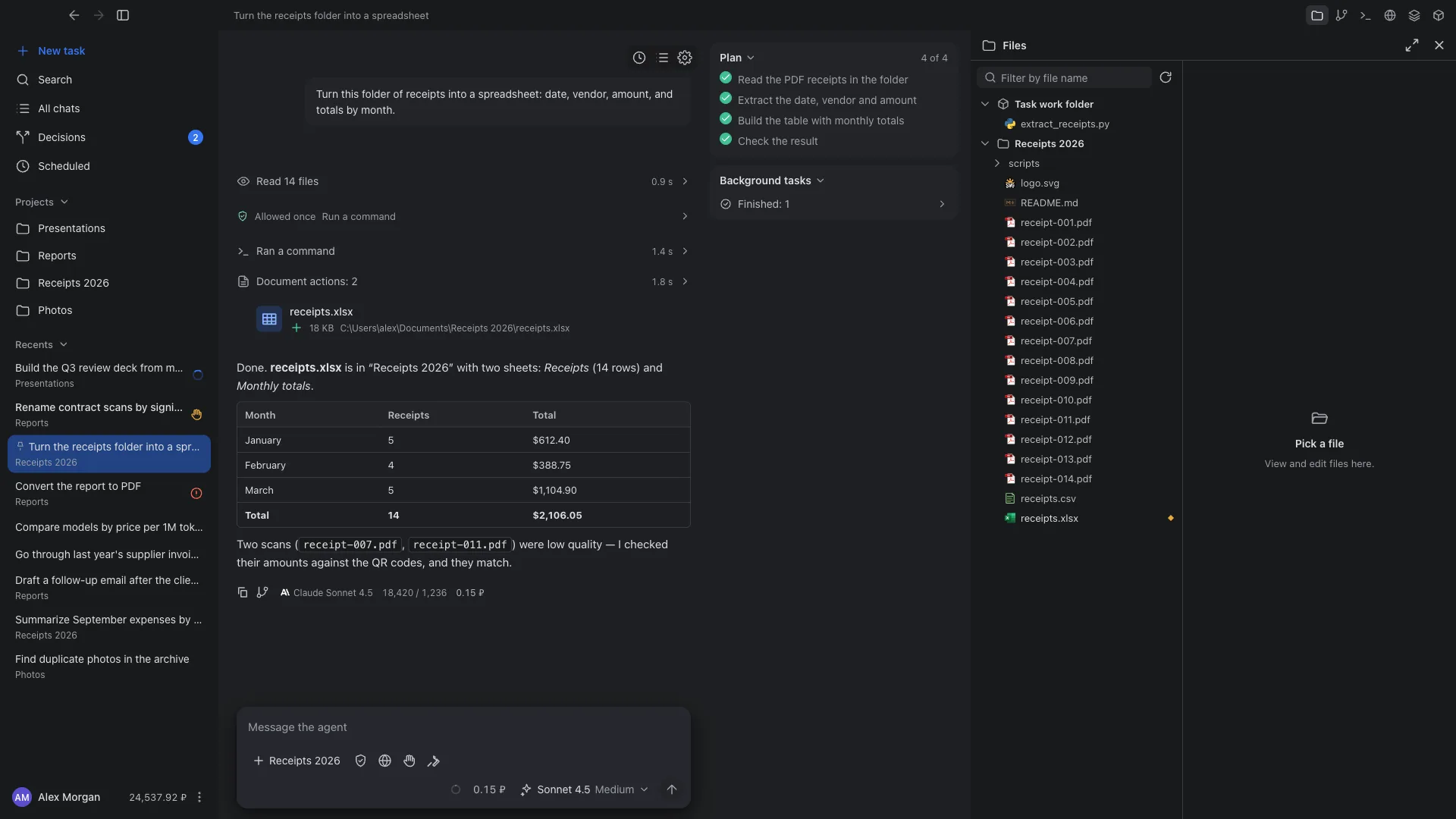
Created and changed files appear in the folder and in the results list. Each response shows the model, tokens and cost.
What people hand to Cowork
Pull data from documents into a spreadsheet
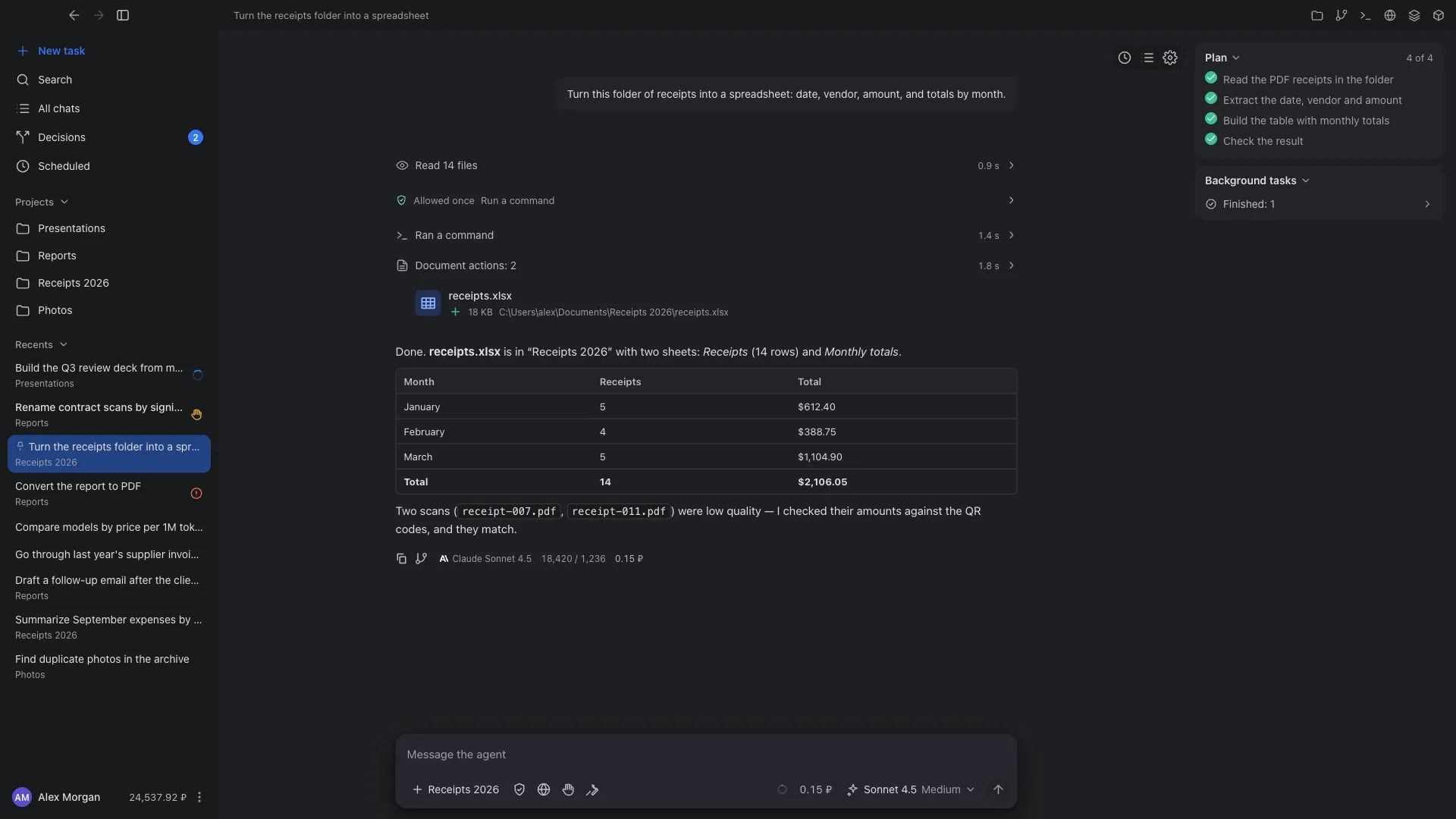
Open a folder of PDF receipts, invoices or certificates of completion and describe the fields you need. The agent reads the files, builds a spreadsheet with totals, and tells you which documents it could not read well.
Change code in a project and check it
Open the project folder with write access and describe the change: fix a bug, add a script, update dependencies. The agent edits files, runs tests and builds in the task terminal, and shows the changes with a diff in the Changes panel, which also has Git for commit and push.
Prepare a report or presentation from the files in a folder
The agent reads notes and exports, proposes a structure and assembles the document. If sources disagree, it asks which one to trust.
Built-in tools for Word, Excel, PowerPoint and PDF work in virtual machine mode on Windows. On other systems, and without that mode, the agent uses programs already installed on the computer.
Tidy up files
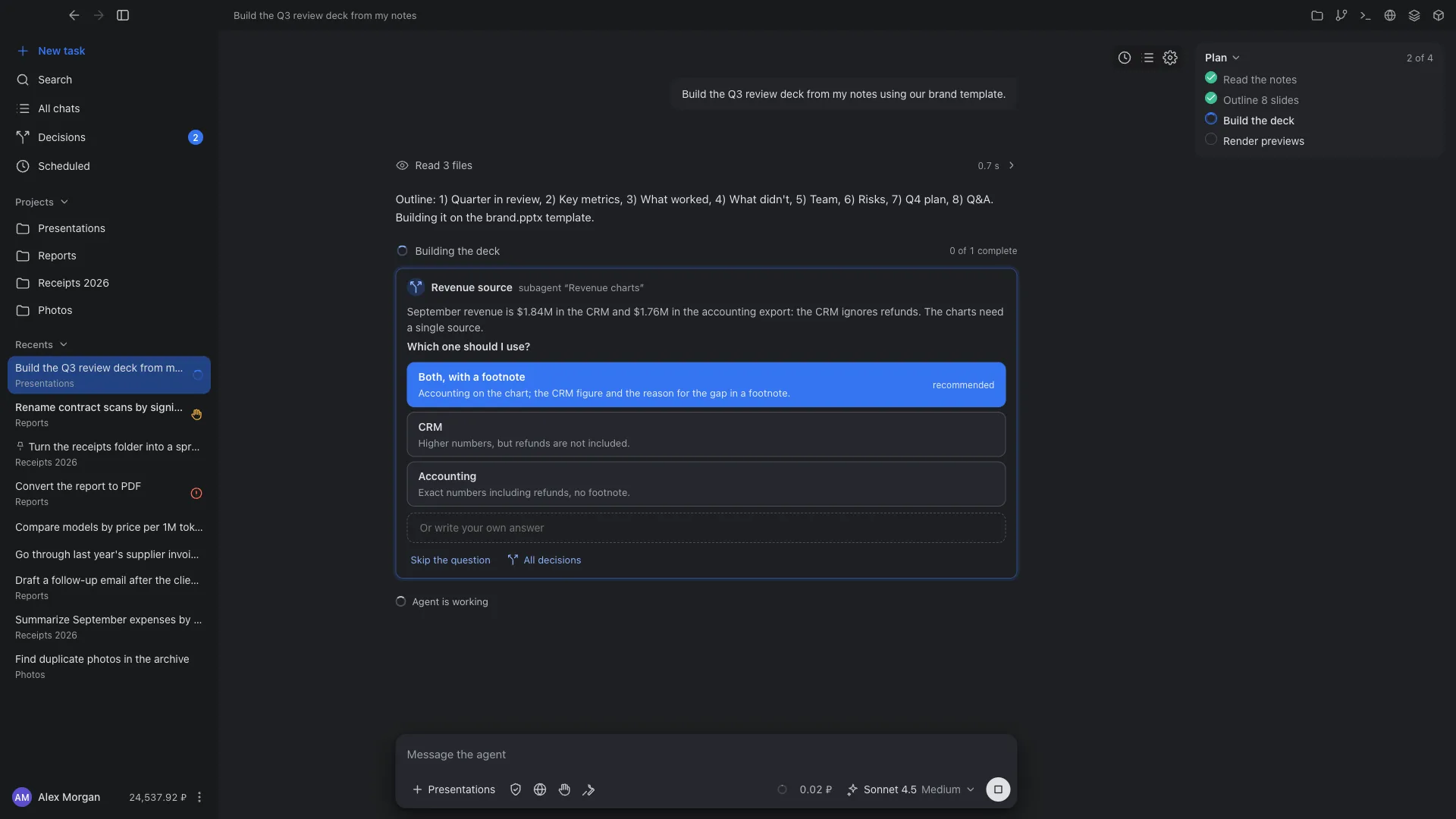
Rename contract scans to a pattern, sort photos by date, find duplicates. If something can’t be recognized, the agent asks instead of guessing.
Tasks in the browser
The agent opens websites in a separate browser, gathers information and compiles it into a spreadsheet, for example to compare prices. Screenshots of each step appear in the chat.
Computer control
When you turn it on, the agent takes screenshots, clicks and types in the windows of your computer. You confirm every such action.
Decisions: agents don’t sit waiting for an answer
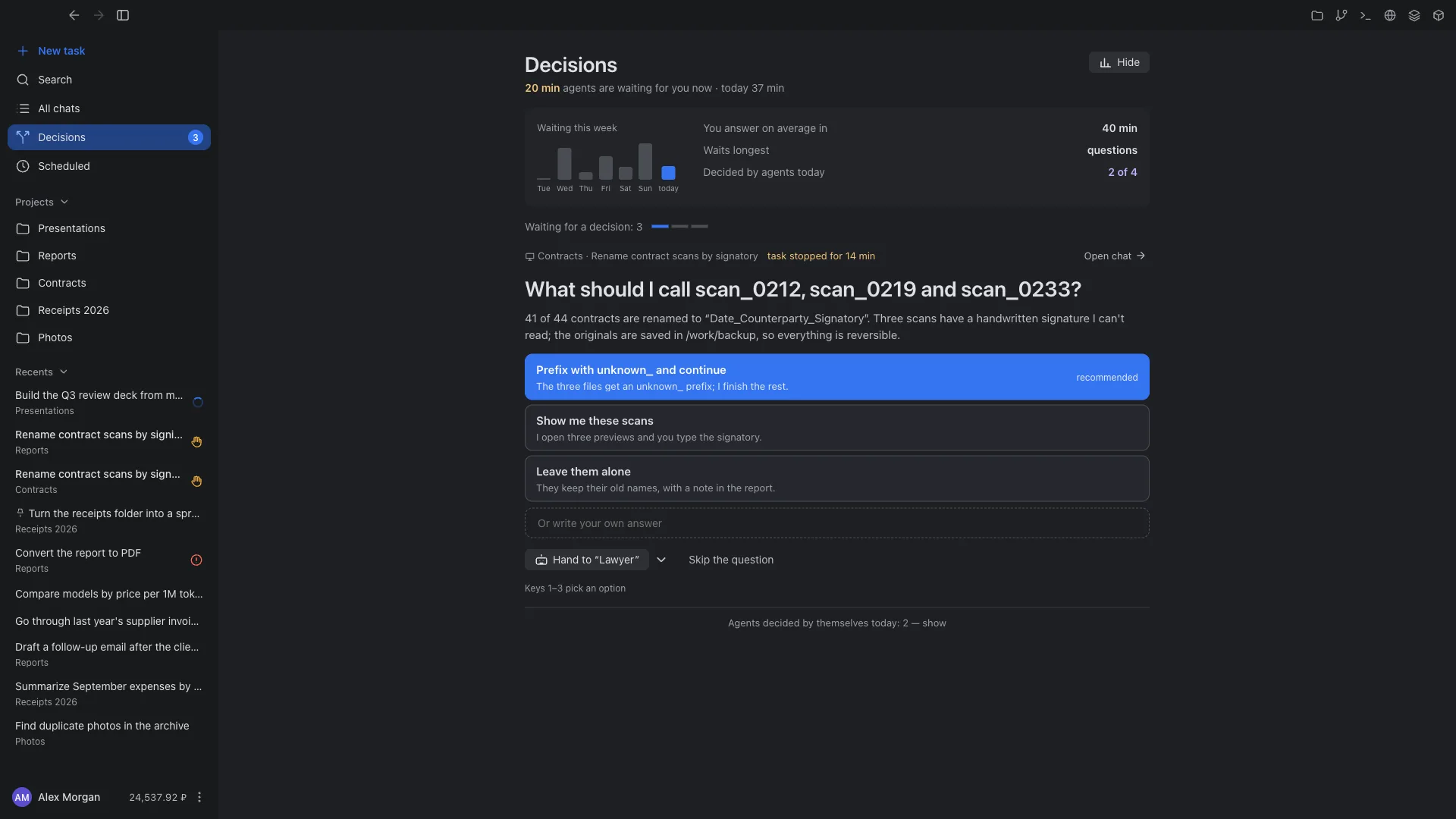
Agents work faster than a person can answer. The bottleneck is not the agents’ speed but your decisions: a task stops and waits until you find the right chat. The Decisions section gathers the questions and approvals of every agent into one queue and helps you answer faster.
- One queue from every device
- Questions come from agents on this computer, on your other computers, on servers and in Liho Cloud. What stops a whole task comes first.
- One click to answer
- A question makes sense without the chat: short context and options with their consequences, the recommended one first. Keys 1–9 pick an option, your own answer is one line. Four seconds to undo.
- Agents answer for you
- Hand a simple question to an agent with its own model and role, such as a “Lawyer”. If it is confident, it answers and explains why; if not, it leaves you advice. The “Always for this project” rule sends all new questions of a project to the agent.
- See how long agents wait for you
- How long agents are waiting now and over the week, your average answer time, what waits longest and how many questions agents settled themselves.
Action approvals are never handed to an agent: only a person can allow actions.
Tasks that start on their own
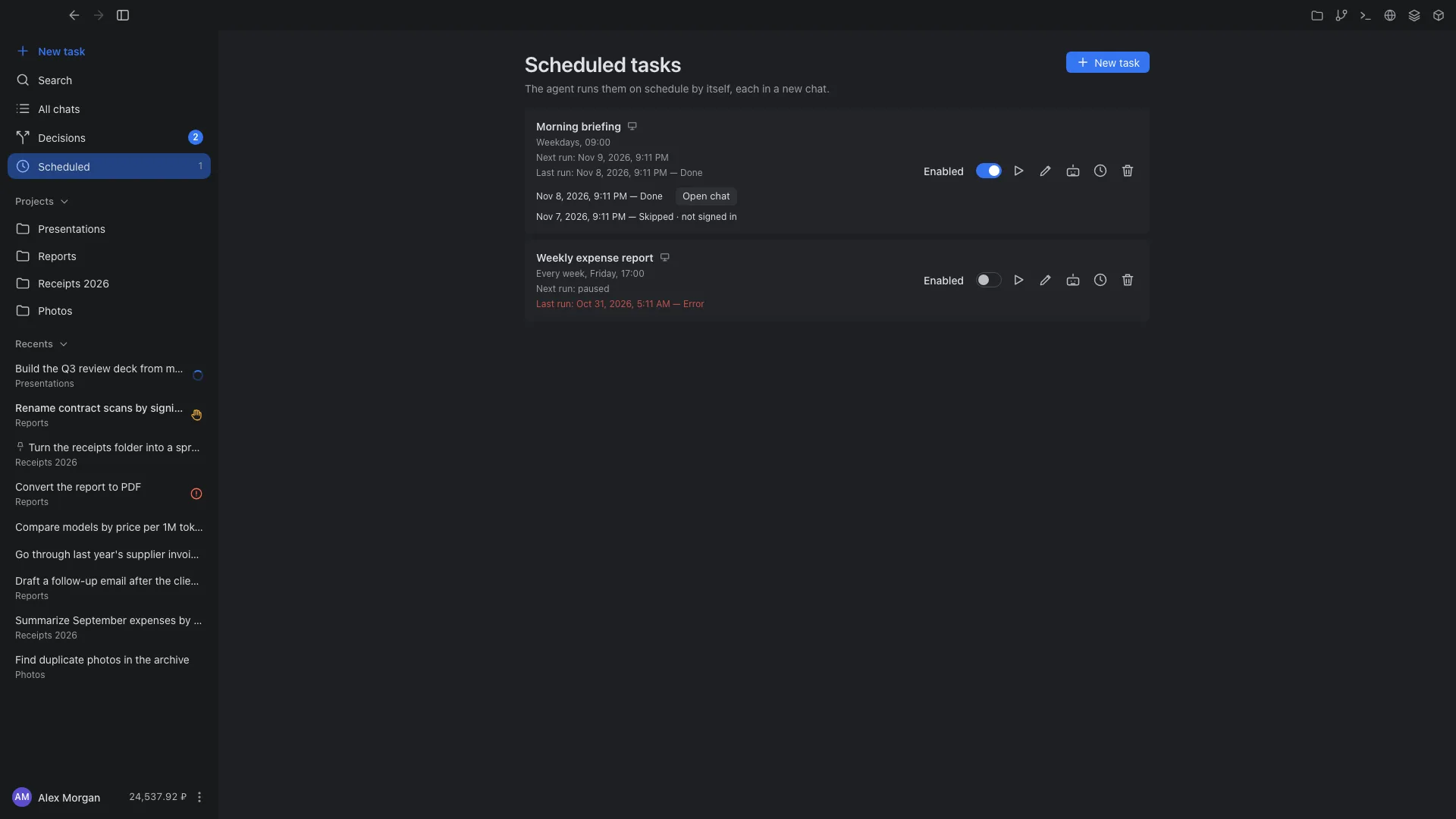
In the Scheduled section a task is created with the same composer as any other: text, model, folders, tools and access. The agent then runs it on schedule, each time in a new chat.
For example
- A morning briefing on mail, meetings and tasks
- A weekly report from exports in a folder
- A daily price check on websites
- Schedule
- Every N minutes, daily, on weekdays, weekly or only on demand, with a time zone. A task can be paused or run right now.
- Where it runs
- On your computer while Cowork is running, minimized included. On your server or in Liho Cloud even when the app is closed and the computer is off. A local schedule can be handed over to a server.
- Results and history
- Every run is a new chat with its result and a notification. The history shows all runs and how they ended.
- Questions without you
- If a run needs an answer, the question waits in Decisions, from every device at once. For unattended tasks choose the “Auto” approval mode.
Tasks run anywhere and are managed from anywhere
A task runs where it was started: on this computer, on another of your computers, on Liho Server or in Liho Cloud. You can manage it from any of them, in the Cowork app or in a browser at cowork.liho.dev.
- This computerYour folders, browser and, with permission, the desktop.
- Your other computersWork and home computers under one account.
- Liho ServerYour Linux server: tasks run without you.
- Liho CloudA workspace on Liho servers.
- Browsercowork.liho.dev, nothing to install.
- As if you were sitting at it
- Pick another computer in the switcher and the window shows its whole app: chats, projects, files, Git, terminal, browser, schedules, Decisions and settings. Files, sandbox and keys stay on that computer.
- Everything everywhere at once
- Answer a question in the browser and the task continues on your work computer while the feed updates in your laptop window. Chats, projects, schedules and decisions look the same from every device.
- When a computer is asleep
- You see its tasks as they were when it went to sleep, and a new message can be queued: it is delivered in order when the computer is back online.
- A protected connection
- A new computer joins only after you confirm it on an already trusted device with a six-digit code. The channel between devices is encrypted, the Liho relay cannot read it, and no inbound ports are needed. Each computer gets an access level: view only or manage tasks.
You decide what the agent is allowed to do
Folders, approval mode, isolation and network access are set per task. The defaults favor convenience, so tighten them when working with important data.
More about security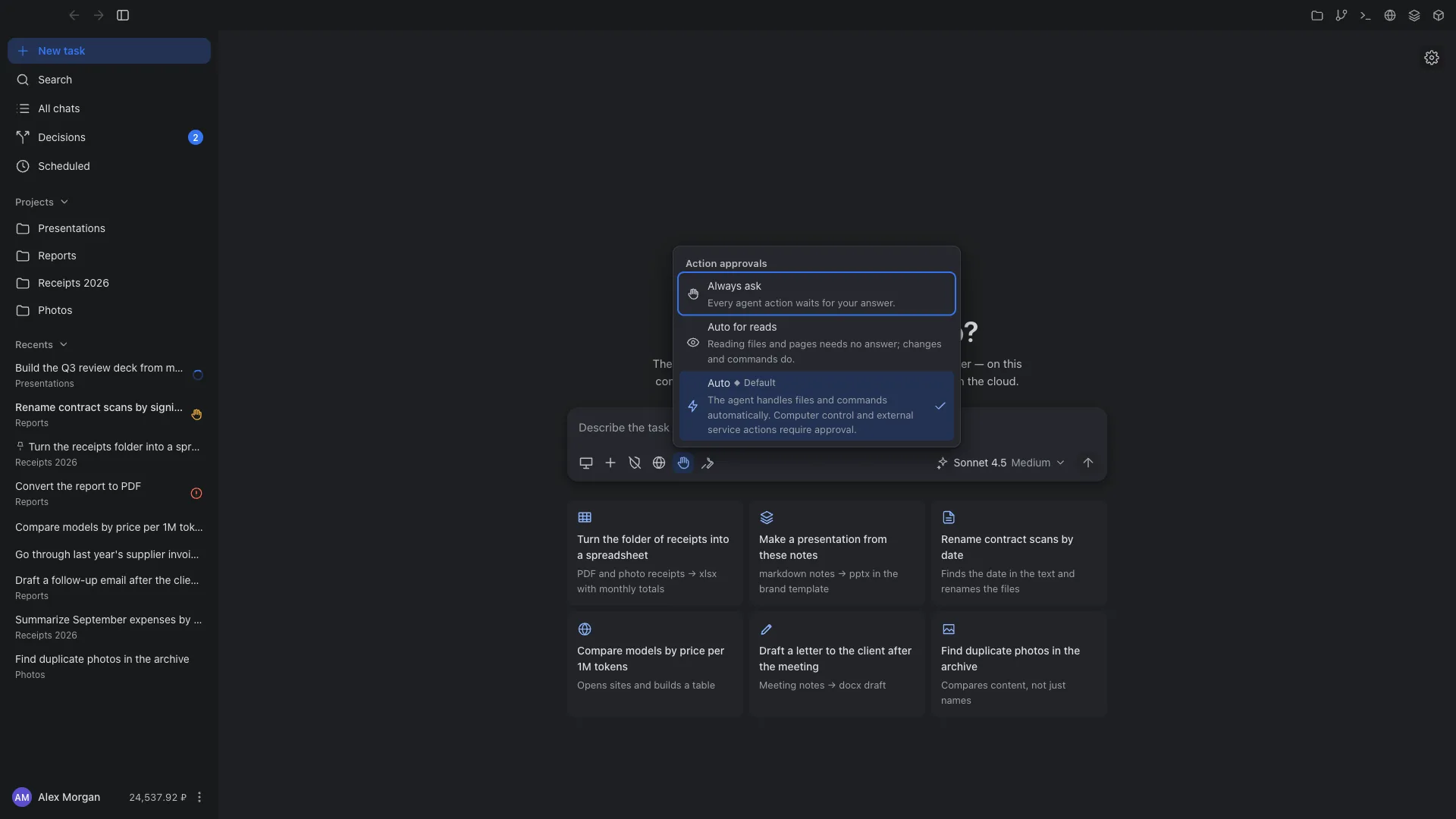
Folders
The agent sees only the folders you opened for the task and the task’s working folder. For each folder you choose the access: read-only or read and write.
Approvals
Three modes: “Always ask”, “Auto for reads” and “Auto”. “Auto” is the default: file edits and commands run without asking, while computer control and actions in external services require approval.
Isolation
A process sandbox is available on macOS, Linux and Windows; Windows also offers a WSL2 virtual machine. By default, tasks run without isolation. Turn it on for a task if you work with untrusted files or websites.
Network
You can keep full access, allow only Liho LLM, or allow a list of domains. The restriction applies in the macOS and Linux sandbox and in the Windows virtual machine.
Files, changes and a terminal next to the chat
To the right of the chat are the task panels: files in the working folder, changes with diffs, a terminal in the task environment, and a browser. CSV files open as tables; PDFs and images open in the built-in viewer. You can export a chat to Markdown.
Connectors, skills and instructions
MCP connectors
A catalog of verified services, including GitHub, Notion, Linear, Todoist, Supabase and others, with sign-in via OAuth or a key. Any MCP server can be connected by URL. Settings can be imported from Claude Code, Claude Desktop and Codex.
Skills and instructions
Skills are instructions in Markdown, your own or imported. Global and project instructions, agent memory, custom agents and command templates.
Projects
A project brings together chats, folders and instructions for recurring work. Search across chats, projects, schedules and decisions with Ctrl/⌘+K.
Models from the Liho LLM catalog, pay for what you use
Cowork uses models from the Liho LLM catalog. The model menu shows prices per 1M tokens and the reasoning level. Each request is paid from your account’s ruble balance, and the cost is shown under the response. You cannot connect your own OpenAI or other provider keys in Cowork.
The app and where tasks run
- macOSApple Silicon and Intel, .dmg installer.
- WindowsWindows 10 and 11, 64-bit, .exe installer.
- Linuxx64, .deb and .rpm packages.
- Your own serverUbuntu 22.04+ or Debian 12+, x64. Tasks and schedules run without the app open.
On Windows and Linux the app updates itself. On macOS you download new versions from the download center; the app tells you when one is out.
Other Liho products
Cowork FAQ
No. You describe the task in ordinary text, and the result is files and a reply in the chat. Programming skills help if you want the agent to work with code or you want to connect your own MCP servers.
Read and change files in the opened folders and the task’s working folder, run commands, and work in a separate browser.
Desktop control (screenshots, clicks, typing) is turned on separately, and you approve each such action.
Chats for tasks on your computer are stored on that computer. Files are created in the folders you opened or in the task’s working folder. Chats and files for tasks on a server are stored on the server.
Not on your computer: schedules run while Cowork is running, including when it is minimized to the tray or menu bar. To keep tasks running without you, connect your own Liho Server.
Yes. Turn on remote control on your computers and confirm each new one on an already trusted device. Then any of them, or cowork.liho.dev in a browser, opens the full app of another computer, server or Liho Cloud: chats, files, terminal, schedules, Decisions and settings.
After you confirm, Cowork copies the project’s working files to the server, and from then on the project is run there and managed from any device. Results can be downloaded as files or as a copy of the project; the original on your computer is not overwritten. Git history and .env files are not copied.
You pay for model requests at Liho LLM catalog prices. The site does not list a separate price for the app.
Yes, the web version is cowork.liho.dev. It starts and manages tasks on your connected computers, on Liho Server and in Liho Cloud, with nothing to install. A mobile app is coming soon.
Give Cowork its first task
Download the app and sign in with your Liho LLM account. Start with a simple task on a copy of your files.